What You’ll Need
Setting up your Aeron chair arms takes about 15 minutes. Gather this first, and you won’t be hopping up and down mid-adjustment.
- Your Aeron, any size. Size A, B, or C all work. Confirm which one you own by checking the label under the seat. A pre-owned, certified chair works just as well as a new one for this job.
- Arm type check. Look at your armrests. Fixed arms won’t move at all. Height-adjustable arms go up and down only. Fully adjustable arms also change width, depth, and pivot.
- A helper or your phone camera. A side-view photo or video shows shrugged shoulders you can’t feel yourself.
- A tape measure. You’ll use it to record elbow height from the floor and the height of your desk surface.
- Your normal work shoes or bare feet. Whatever you wear while working. Footwear changes seat height by an inch or more.
- Your usual desk setup. Keyboard, mouse, and monitor in their permanent spots. Adjusting arms against a messy temporary layout sends you back to square one.
- A small notepad. Jot down the final arm height, width, and pivot settings so you can restore them later.
- Basic know-how. None needed. Fully adjustable Aeron arms move by hand with levers and a thumb wheel. No tools required.
Time required: about 15 minutes for the initial setup, plus two weeks of small tweaks as your muscles adjust.
Your neck aches by 2 p.m. Your right shoulder sits closer to your ear than it did this morning. Sound familiar? Odds are the problem isn’t your posture, it’s your armrests.
An aeron chair is one of the most adjustable seats ever built, yet most owners never touch the arms after unboxing. That’s a costly miss. When the pads sit too high, the shoulders hike up and the upper traps work all day without a break. Too low, and the torso collapses sideways to find support. Either way, the tension builds quietly, hour after hour (and week after week), until it feels like a normal part of working from home.
Here’s the good news. Fixing it takes about ten minutes and no special gear. A certified ergonomics consultant with 20 years of office assessments will tell you the same thing: arm height is the fastest win in the whole chair. The sequence matters, though. Adjust in the wrong order and you’ll chase the same ache around your body.
Start with what the arms are actually supposed to do.
What You’ll Fix and What You Need Before You Start
Why Wrong Arm Height Causes Neck and Shoulder Tension
A designer at a kitchen-table desk finishes a six-hour day with a tight, burning ridge across her upper traps. Her Aeron chair is fine. The arms are sitting two inches too high.
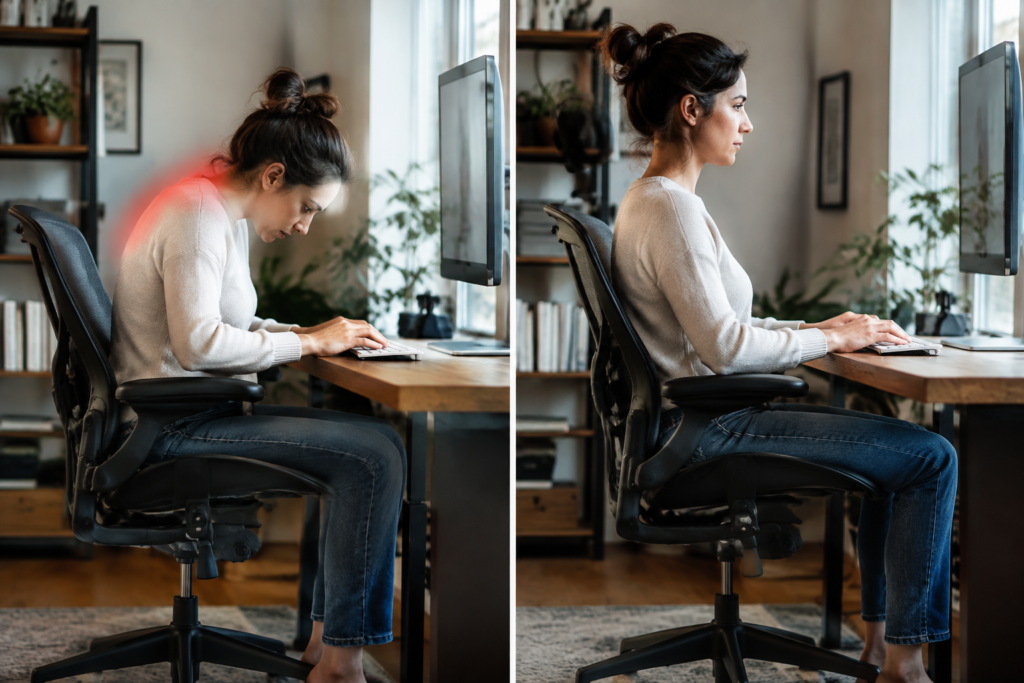
Here’s what happens. Raised arms push the shoulders up toward the ears, and the upper trapezius works nonstop to hold them there. Arms set too low do the opposite: the torso slumps sideways and the neck cranes to compensate. Either way, the muscles never rest.
The fix takes five minutes. Elbows should hang at about 90 degrees, shoulders loose.
Tools, Measurements, and Aeron Arm Types to Check (Fixed, Height-Adjustable, Fully Adjustable)
Gather very little. A tape measure, your keyboard tray or desk — a phone for a side-view photo will cover it. Measure from seat to elbow while seated with relaxed shoulders. Write that number down.
Next, identify which arms the chair has. An Aeron chair by Herman Miller ships in three arm styles:
- Fixed arms: No adjustment. The pad height is set, so check whether it clears your desk edge.
- Height-adjustable arms: Move up and down only. Fine for many users, though width stays put.
- Fully adjustable arms: Height, width, depth, and pivot. Best for tight shoulder problems.
Arm range runs roughly 7.5 to 11.5 inches on sizes A and B, and 8 to 12 on size C. Compare that against your elbow measurement before touching anything.
Step 1: Set Your Seat Height and Sit Back First
Arm height means nothing until the seat is right. Every armrest adjustment on an Aeron chair depends on where the pelvis sits, so start there. Skip this and the arms will be wrong no matter how long they’re fiddled with.
Sit all the way back until the lower spine touches the PostureFit SL pads. Then raise or lower the pneumatic cylinder lever until both feet rest flat on the floor with thighs roughly parallel to it. Knees should sit at or just below hip level. A foot that dangles or a knee that climbs above the hip tilts the pelvis backward — the shoulders follow (a chain reaction most people never trace).
Check the seat edge next. Two to three finger-widths of space should sit between the front of the 8Z Pellicle and the back of the knee. Too tight? The size may be wrong, since Size B fits most people from 5’3″ to 6’2″ while Size A and Size C cover the extremes. A Herman Miller Aeron ergonomic office chair is only as good as the size matched to the body.
- Sit fully back against the pads.
- Set the height so feet are flat.
- Confirm thighs are level and the knee gap is visible.
- Lower the arms out of the way before moving on.
Shopping for a certified, pre-owned unit? Madison Seating lists all three sizes with a warranty.
Step 2: Find Your Elbow Height With Relaxed Shoulders
Check the Aeron Size Chart (Size A, B, or C) Before Blaming the Arms
Why does a perfectly set armrest still leave the neck tight by 2 p.m.? Often the arms aren’t the problem. The frame is the wrong size.
Start with the chair itself. Sit back, drop your shoulders, and bend your elbows to 90 degrees. Your forearms should float level with the desk. If the arms can’t reach that spot, the Aeron size is off. Check the chart:
- Size A: 4’10” to 5’7″, under 130 lbs. Arm range runs 7.5″ to 11.5″.
- Size B: 5’3″ to 6’2″, 130 to 230 lbs. It fits about 70% of users, with the same 7.5″ to 11.5″ arm range.
- Size C: 5’9″ to 6’6″, over 200 lbs. Arms rise from 8″ to 12″.
Taller users often stall on Size B. The arms top out too low, so shoulders hike up to meet them. A herman miller aeron chair size c gives that extra half inch of lift and a deeper 17.5″ seat pan (a bigger difference than it sounds).
Confirm your size first. Then adjust. Browsing a Herman Miller Aeron task chair lineup is easier once the right frame is settled, because the arm pads only work when the frame fits your body.
Step 3: Adjust Aeron Arm Height, Width, Depth, and Pivot in Order
Roughly 7 in 10 desk workers who report shoulder tension have armrests set too high or too wide. Fix them in this order: height, width, depth, pivot. Skip around — you’ll chase the same adjustment twice.
Height: Match the Arm Pad to Your Elbow at 90 Degrees
Sit back, relax your shoulders — bend your elbows to 90 degrees. Raise the pads until they just touch the underside of your forearms. No higher. If your shoulders creep upward, the pads are too tall, and that’s the classic cause of a tight upper trapezius. Arm range runs about 7.5″ to 11.5″ on Sizes A and B, and 8″ to 12″ on an aeron chair size c.
Width and Depth: Keep Forearms Supported Without Pushing Shoulders Out
Slide the pads inward until your upper arms hang straight down from the shoulders. Then check the depth. Here’s what most people miss: pads pushed too far forward pull the shoulders into a hunch.
- Width: Elbows stay close to your ribs, never flared.
- Depth: The pad ends near the middle of the forearm, not at the wrist.
Pivot: Angle the Pads for Keyboard and Mouse Work
Rotate the pads slightly inward, about 10 to 15 degrees, so your wrists stay straight when typing. Mouse-heavy work? Angle the mouse-side pad a touch more. Test it with a five-minute typing burst. Does your neck feel loose? Good. If not, drop the height by a quarter inch and try again.
Step 4: Match Arm Position to Your Desk, Monitor, and Typing Setup
Lower arms aren’t better arms. That’s the myth behind most shoulder tension, and it’s wrong. An Aeron chair armrest set too low forces a slump toward the desk, while one set too high shrugs the shoulders up toward the ears. Neither is fixed by a generic setting.
Start with the desk. Sit back in the seat, let your shoulders drop, and bend your elbows to roughly 90 degrees. Raise the arms until the pads just touch your forearms. They should support, not lift.
- Typing: Pivot the arms inward slightly so forearms stay parallel with the keyboard.
- Mouse work: Pull the width out a bit, because the mousing arm drifts wider.
- Monitor use: Slide the arms forward or back using the depth control so elbows stay close to your ribs.
Here’s what most people miss: desk height decides everything. If the desk is fixed and too tall, raise the seat and arms together, then add a footrest. Don’t crank the arms alone.
Smaller users have less room for error. A person fitting the herman miller aeron chair size a has a lower arm range, so check that the pads clear the desk edge before settling in.
Test it for 20 minutes. Tension in the upper trapezius means the arms are still too high.
Troubleshooting: Common Arm Height Mistakes and Quick Fixes
A designer at her kitchen-table desk notices her neck burning by 2 p.m. She blames the monitor. The real culprit sits two inches lower: her armrests. Most Aeron tension complaints trace back to a few arm errors, and each one takes under a minute to fix.
Arms Too High: Shrugged Shoulders and Tight Upper Traps
Look in a mirror. If your shoulders sit near your ears, the pads are too high. The upper traps stay switched on all day. Lower the arms until your elbows hang at about 90 degrees and your shoulders drop loose. Then check again after an hour (your body will tell you).
Arms Too Low or Too Wide: Slouching and Leaning
Too low, and you lean onto one elbow. Too wide, and your shoulders pull outward. Both twist the spine. Try this:
- Raise the pads until they just touch your forearms.
- Slide them inward so elbows stay close to your ribs.
- Pivot them slightly so your wrists stay straight on the keyboard.
Fixed Arms or Wrong Aeron Configuration: When a Pre-Owned, Certified Upgrade Makes Sense
Fixed arms can’t do any of this. And that’s the dead end. A fully loaded Herman Miller Aeron Size B gives height, width, depth — pivot control, and it suits most people between 5’3″ and 6’2″. A pre-owned, certified, authentic chair with a warranty keeps the upgrade practical. Does your current Aeron adjust in all four directions? If not, switch.
Step 5: Verify the Fit and Fine-Tune Over the First Two Weeks
Arm settings that feel right on day one often aren’t. Sit in the Aeron chair for a full workday, then judge the setup by how your neck and shoulders feel at 4 p.m. (not at 9 a.m.).
Run the Quick Fit Check
Sit back, drop your shoulders, and type for two minutes. Then check three things:
- Elbows: bent near 90 degrees, forearms floating level with the desk.
- Shoulders: relaxed, with no shrug toward your ears.
- Pads: lightly touching your forearms, not shoving them outward.
Still feeling a pinch? Lower the arms one notch. Small moves matter here.
Adjust in Small Steps
Change one setting at a time and give it a full day. If you’ve set the seat height and the back support properly, the arms are usually the last piece. The aeron chair posturefit model also lets you tune sacral and lumbar support, and a slumping back will pull your shoulders forward no matter where the arms sit.
Realistically, most people need two or three tweaks. Expect the tension to ease within the first one to two weeks as muscles adjust.
Keep notes. Write down each change and how your neck felt that evening. If nothing improves after two weeks, recheck the chair size before touching the arms again.
How-To FAQ
How long does it take to set Aeron chair arm height?
Plan on about five minutes for the first setup and two weeks for fine-tuning. The adjustments themselves take seconds. What takes time is your body learning to relax into the new position, so expect to tweak the arms a few times during that first stretch.
What’s the right Aeron arm height for neck and shoulder relief?
The pads should sit level with your elbows when your shoulders are fully relaxed — your elbows bend to roughly 90 degrees. Here’s a quick check:
- Too high: your shoulders creep up toward your ears.
- Too low: you lean to one side or hunch to find support.
- Just right: your forearms rest lightly and your shoulders drop.
Why do my shoulders still hurt after I lowered the arms?
Arm height is only one piece of the fit. If the pain sticks around, check your seat height, monitor position, and keyboard distance. A desk that sits too high will push your shoulders up no matter where the pads are. Also confirm your Aeron size (A, B, or C) matches your frame, because a chair that’s too big or small throws off every other setting.
Should I take the arms off if I can’t get them right?
No. Removing them usually makes neck and shoulder tension worse because your forearms lose support while you type. Try narrowing the width and angling the pivot first. If your chair has fixed or limited arms, a pre-owned, certified Aeron with fully adjustable arms is the better fix.
Is it safe to adjust Aeron arms myself?
Yes, and it needs no tools. Use the lever or button under each pad and move the arms slowly. Keep your hands clear of the pivot points, and don’t force an arm past its stop. If one slips or feels loose, stop and have it inspected. Certified pre-owned chairs from a seller with a solid warranty get checked for exactly this kind of wear.
Do I need to readjust the arms if I switch between typing and mouse work?
Usually only slightly. Pivot the pads inward a few degrees for keyboard work, then open them a touch for mouse use so your elbow doesn’t drift away from your body. If you change tasks often, set the arms for the one you do most — make small tweaks for the rest.
Neck and shoulder tension rarely comes from one big mistake. It builds from small ones. An armrest sitting an inch too high keeps the trapezius clenched all day, and the owner of the best-engineered seat on the market still ends up rubbing their neck by three o’clock.
The fix is short. Seat height comes first, then elbows at roughly 90 degrees with shoulders loose, then the arm pads set to meet the forearms without pushing them outward. Width, depth, and pivot finish the job. A properly sized Aeron chair gives every one of those controls room to work, which is why checking Size A, B, or C matters before anyone blames the arms.
Give the new setup two weeks.
Muscles that spent months compensating need time to settle.
If the arms on the current chair are fixed and can’t be moved, the setting itself is the problem. Browse Madison Seating’s pre-owned, certified fully adjustable Aeron models, pick the size that matches the height and weight ranges above, and use the 30-day guarantee to confirm the fit at the actual desk. Then lower those shoulders and get back to work.