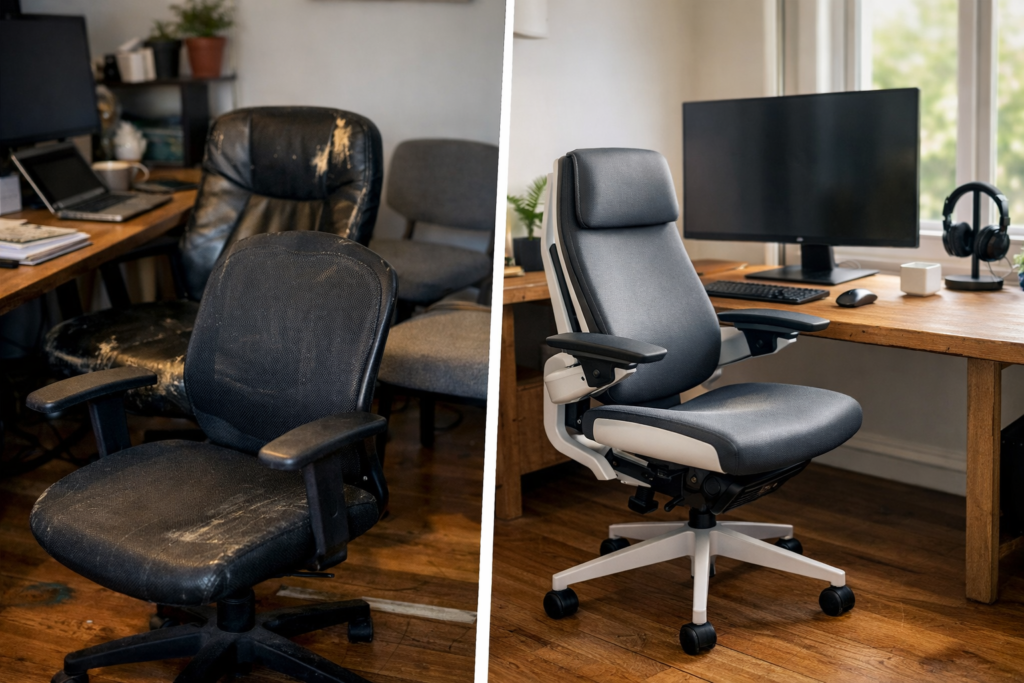
Key Takeaways
- Compare the Steelcase gesture chair against the real five-year cost of replacing budget chairs every 18 to 24 months, not just the upfront price tag.
- Match chair features to the body, not the marketing: adjustable arms, lumbar support, seat depth, and recline control matter far more than a thick cushion or a flashy headrest.
- Check whether a refurbished or certified pre-owned Steelcase chair can deliver the same ergonomic support as a new one, while making the math easier for home office buyers.
- Skip oversized gaming, accent, wingback, and similar chairs if the goal is all-day office support; they usually miss the movement and lumbar control desk workers need.
- Use five-year replacement math to judge value: one well-built Steelcase chair can beat three cheaper chairs once repair, comfort, and lost productivity are counted.
Three cheap chairs in five years isn’t a bargain. It’s a pattern. The Steelcase gesture chair keeps showing up in those comparisons because desk workers are tired of buying the same promise twice: soft seat, quick fix, short life. A chair that looks fine in month one can feel wrong by month 18, and by year three, it’s usually the neck, shoulders, or lower back paying the price.
For remote and hybrid professionals who sit six to ten hours a day, that cycle gets expensive fast. A worn cushion loses shape. Armrests drift. The backrest stops matching the way the body actually moves. Then the workday gets smaller, one tight shoulder at a time. The honest answer is blunt: a chair that supports changing posture all day often costs less than repeated replacements, even before the pain enters the math.
That’s why this model gets so much attention from people comparing premium ergonomic chairs. It’s built for motion, not just sitting still (which is what most desk jobs pretend you’ll do). And once the body has to switch between laptop work, mouse-heavy tasks, and phone calls, support stops being a luxury. It becomes the difference between getting through the day and counting the minutes until the next stretch break.
Why remote workers keep replacing cheap chairs instead of fixing the real problem
He bought a budget chair in January, replaced the gas cylinder by fall, and ordered a new seat cushion before the next review cycle. That pattern looks normal until the receipts add up, because the chair wasn’t the problem — the lack of real support was.
The five-year cost of a chair that breaks down after 18 to 24 months
A bargain chair often needs a new cushion, arm pad, or swivel base by year two. Three replacements in five years can easily pass the price of a single steelcase gesture chair, especially once shipping and lost work time enter the math.
The honest answer is that a Steelcase Gesture ergonomic chair is priced for daily use, not occasional sitting. Someone comparing a Steelcase Gesture office chair to a stack of cheap alternatives should ask one blunt question: how many repairs can the old chair survive before it stops being “cheap”?
How poor seat support turns into neck, shoulder, and lumbar pain
Weak lumbar support lets the pelvis tip back, which pulls the spine into a tired C-shape. From there, the neck starts compensating, the shoulders creep up, — the upper back takes the hit.
For computer work, the Steelcase Gesture chair matters because its arm support and seat geometry keep the forearms and screen line in better sync. That’s why people often buy Steelcase Gesture chair options when they’re done cycling through gaming-style chairs, oversized accent seats, or even odd one-offs like kneeling rail designs. It’s not about style. It’s about staying in one piece through the workweek.
It’s not the only factor, but it’s close.
Gesture chair by Steelcase remains a practical pick for workers who sit six to ten hours a day. For some buyers, a Steelcase Gesture chair for computer work is the first chair that actually matches how they use a desk.
Madison Seating is one source for certified pre-owned models, which matters when the goal is better support without paying full retail.
What the Steelcase Gesture chair changes in daily desk use
Could one chair really replace three budget chairs over five years? In practice, yes — if the desk work shifts from laptop to mouse to phone calls all day, the Gesture chair by Steelcase is built for that churn. It’s a Steelcase Gesture ergonomic chair that gives steady lumbar support without forcing one fixed posture. That matters after hour six.
3D LiveBack-style support, seat depth, and arm motion for laptop, mouse, and phone work
The Steelcase Gesture office chair changes the way the upper body settles. Its arms move far enough to support a phone hold, a tucked-in typing stance, or an oversized keyboard setup, — the seat depth helps keep the back of the knees clear. That’s a real upgrade over a basic chair with a cushion and little else. For computer work, the Steelcase Gesture chair for computer work reduces shoulder shrugging and neck strain fast.
Why the Gesture fits hybrid professionals who shift posture all day
Hybrid workers rarely sit the same way for long. One minute they’re on Zoom, then they’re leaning forward to edit a spreadsheet, then they’re reclined with a headrest off screen (which is exactly why a rigid gaming chair often fails). The Steelcase gesture chair handles that motion better than most refurbished, brown, club-style, or wingback office chairs. Madison Seating lists certified pre-owned units for buyers who want premium support without paying full new-chair pricing.
- Best for: 6-10 hour desk days
- Not ideal for: deep recline-only lounging
- Worth checking: arm range, seat depth, and lumbar feel
Is the Steelcase Gesture worth it for home office buyers comparing premium ergonomic chairs?
Short answer: yes, if the chair is doing eight to ten hours a day. The Steelcase gesture chair costs more up front, but a rough five-year view changes fast once a $300 budget chair starts sagging, squeaking, or forcing shoulder tension back into the workday.
Price shock versus total cost of ownership over five years
A home-office buyer isn’t just buying a chair. They’re buying support, a seat that moves with the spine, and fewer replacement cycles. Three budget chairs at $250 to $400 each can land near $1,200 after shipping and replacements, while one Steelcase Gesture office chair can still be cheaper per year if it holds up and keeps the user working without a bad back flare-up. That’s the honest math.
- Year 1: Comfort is easy to dismiss.
- Year 2-3: the cushion flattens, lumbar fades, and the swivel base starts to wobble.
- Year 4-5: replacement becomes the hidden bill.
Refurbished vs. new: where certified pre-owned makes the math easier
For buyers who want a premium ergonomic chair without retail sticker shock, the Gesture chair by Steelcase becomes easier to justify refurbished. A certified pre-owned unit from Madison Seating can cut the entry cost sharply while keeping the same arm travel, headrest options, and back support that matter for computer work. That’s why a buy Steelcase Gesture chair decision often makes more sense through the Steelcase Gesture ergonomic chair resale market than through a fresh-box purchase.
And here’s the thing: people don’t need a gaming chair, a kneeling chair, or an oversized accent piece. They need one office chair that handles real desk hours, day after day. The Steelcase Gesture chair for computer work does that better than most budget chairs can pretend to.
What chair features actually matter for back pain, lumbar support, and posture
The Steelcase gesture chair helps because it supports the body instead of asking the body to hold itself together for eight hours.
- Adjustable arms keep elbows close and shoulders down. That matters for neck pain, especially during computer work.
- Recline tension lets the back move without dumping load into the lower spine. A good chair should feel stable, not stiff.
- Seat cushion quality affects pressure on the thighs and sit bones. Too soft, and posture collapses; too hard, and the day gets long fast.
- Headrest options matter for people who lean back during calls. It’s support, not a nap station.
For shoppers comparing premium seats, the Steelcase Gesture office chair fits the same conversation as a Gesture chair by Steelcase, a Steelcase Gesture ergonomic chair, and a Steelcase Gesture chair for computer work. Those phrases point to one thing: a chair built for long desk sessions, not occasional sitting.
Why oversized, gaming, accent, and wingback chairs usually miss the mark
Oversized and gaming chairs often look supportive, but the fit is wrong. The lumbar bump lands too high. The cushion is too deep. The arms sit too far apart.
Accent, wingback, club, and chiavari styles are worse for desk use because they’re made for appearance or short sits. Even a refurbished leather chair can fail if the back shape and seat depth don’t match the user. The honest answer is simple: for pain relief, form has to serve function.
It’s a small distinction with a big impact.
For buyers ready to buy Steelcase Gesture chair options, Madison Seating is one place where certified pre-owned inventory can make the math work without giving up support.
How does the Gesture compare with other best office chairs for long sitting sessions
Write this section as if explaining to a smart friend over coffee — casual but accurate and specific. The Steelcase gesture chair stands out for one simple reason: it keeps supporting the arms and upper back while the user keeps moving. That matters on a 6-to-10-hour office day, especially for computer work that pounds the neck and shoulders. A buy Steelcase Gesture chair search usually starts after a cheap chair starts failing at hour three.
The gesture chair by Steelcase feels different from a softer cushion-only chair. The seat is firm, the swivel is smooth, and the arms track a wider range of motion than most budget chairs. That helps when switching from keyboard to phone to mouse without shrugging into stress posture.
Steelcase chair design versus Herman Miller, Humanscale, and Embody-style support
Compared with an Embody-style back or a Herman mesh setup, the Steelcase Gesture ergonomic chair puts more emphasis on arm positioning than on a purely floating backrest. Humanscale models often feel lighter and simpler. The Gesture chair by Steelcase is better for people who want a chair that follows movement instead of forcing one fixed posture.
Madison Seating often sees buyers compare a Steelcase Gesture office chair with a refurbished premium chair, then realize the real question isn’t price alone. It’s how many hours of pain-free sitting they get before the chair starts to feel wrong. The honest answer: if arm, lumbar, — seat depth support matter most, Gesture is hard to beat.
Here’s what that actually means in practice.
When a kneeling chair, saddle seat, or zero-gravity chair makes more sense
A kneeling chair, saddle, or zero-gravity chair can help for short bursts, rehab work, or standing-desk breaks. They’re not the best office chairs for long sitting sessions. For full-day desk use, most people do better in a traditional ergonomic chair with real support — not novelty. That’s where the Gesture chair for computer work earns its keep.
One blunt truth: if the chair looks interesting but your shoulders creep up by 2 p.m., it’s the wrong chair.
Buying a Steelcase Gesture chair for real-world work setups
One chair can erase three budget buys over five years. That sounds backward, but a Steelcase gesture chair often does the job for people who sit 6 to 10 hours a day, switch between typing, reading, and calls, and need steady support without chasing a new fix every 18 months. The Gesture chair by Steelcase fits that pattern because its arms move in tight, useful ways, and the seat keeps pressure from piling up under the thighs.
For a Steelcase Gesture chair for computer work, the real test is a dual-monitor setup, not a 5-minute showroom sit. The Steelcase Gesture ergonomic chair stays useful when the user reaches, turns, or leans back between tasks. A Steelcase Gesture office chair also helps on hard floor surfaces because the swivel base and proper caster choice cut drag and protect the floor finish.
Standard office use, dual monitors, floor protection, and swivel mobility
Realistically, the best setup is plain: seat height so feet stay flat, lumbar support centered, and armrests just low enough to let shoulders drop. For a remote worker, comparing chairs, that’s the difference between a chair that looks good and one that holds up during deadlines. Need a quick rule? If the elbows hover and the neck tightens by hour three, the fit’s off.
Leather, fabric, brown finishes, and replacement parts for long-term use
Leather gives a firmer feel, fabric usually runs cooler, and brown finishes can hide light wear better than pale upholstery. A buyer who plans to buy Steelcase Gesture chair stock should ask about replacement arms, casters, and cushions before deciding. That’s where Madison Seating’s certified-pre-owned path can make sense for people who want premium support without paying new-chair prices.
The short version: it matters a lot.
The five-year replacement math: one Gesture chair versus three budget chairs
A remote analyst swaps a $280 chair every 18 to 24 months, then wonders why the back, neck, and shoulders never settle down. A Steelcase gesture chair changes that math fast. It’s the kind of office chair built for long desk days, with a seat, lumbar support, and swivel motion that hold up across years, not just months.
Here’s the blunt part. Three cheap chairs can look cheaper on paper, but broken cushions, failed arms, and sagging support add up. A Steelcase Gesture ergonomic chair typically keeps its posture and comfort much longer, so the real comparison is repair, warranty, and lost productivity across five years. That’s where the gap opens.
Repair, warranty, comfort, and productivity loss across a five-year window
A budget chair often needs replacement parts by year two. The Gesture’s frame, back, and adjustability are built for heavy office use, and that matters for people doing computer work 6 to 10 hours a day. For buyers comparing gaming-style chairs, oversized models, or even a refurbished accent chair, the Gesture usually wins on lasting support.
- Budget chairs: lower upfront cost, higher replacement cycle
- Gesture: higher first cost, lower churn, steadier comfort
- Work impact: fewer pain breaks, less mid-day shifting, better focus
For shoppers ready to buy Madison Seating, the value case is stronger when the chair replaces repeated purchases. The phrase Steelcase Gesture office chair sounds premium because it is, and buying a Steelcase Gesture chair makes the most sense for users who want the Steelcase Gesture chair for computer work and plan to keep it in service for years.
Who should buy it, who should skip it, and what to look for before checkout
The fit is best for full-time desk users, chronic pain sufferers, and anyone tired of buying a new chair every 2 years. Skip it if the chair will sit unused, or if the body needs a kneeling rail, headrest, or a very different profile like a chair by Steelcase alternative, Herman Miller Embody, Humanscale, or even niche models such as a brown wingback, club chair, or zero-gravity recliner.
Sounds minor. It isn’t.
Before checkout, check arm range, seat depth, lumbar feel, and warranty terms. The honest answer is simple: if the chair saves one replacement and reduces pain, the five-year math usually favors the Gesture.
Frequently Asked Questions
Is the Steelcase Gesture worth it?
For people who sit 6 to 10 hours a day, yes — the Steelcase Gesture chair earns its price by doing the basics well and the details even better. The arm system is the standout, especially for people who type, mouse, and switch between laptop and monitor all day. If the chair is going to be the main seat in a home office, it’s a strong pick. If the user sits for only a couple of hours a day, it’s probably more chairs than they need.
What is the Rolls-Royce of office chairs?
People use that phrase for a few premium chairs, but the Steelcase Gesture is often in that conversation because of its range of motion, support, and refined build. A Herman Miller chair may get the same label from some buyers, and that’s fair, too. The honest answer is that there isn’t one single winner for everyone. The best chair is the one that fits the body and the workday.
What chairs do chiropractors recommend for an office?
Chiropractors usually point people toward ergonomic chairs with real lumbar support, adjustable seat height, proper seat depth, — armrests that don’t force the shoulders up. The Steelcase Gesture fits that general profile, especially for users who need better upper-body support during long desk sessions. No chair fixes pain by itself, though. If a person already has persistent back or neck symptoms, the chair has to match the body, not just the price tag.
What chair does Joe Rogan use?
He’s been linked with different premium office chairs over time, and that question comes up a lot because people want a shortcut to the “best” seat. The problem is simple: celebrity chair choices don’t tell a buyer much about fit, cushion feel, or lumbar support. A chair that works for a podcaster sitting in one setup may feel wrong for someone in a hybrid office with a standing desk, dual monitors, or a narrower frame.
How does the Steelcase Gesture compare with the Herman Miller Embody?
The Gesture tends to feel more supportive in the arms and upper body, while the Embody is known for its back feel and pressure distribution. For people who move a lot at the desk, the Gesture’s arm articulation is a real advantage. For users who want a very different seat feel, the Embody may win. This is one of those cases where a five-minute showroom sit can fool people.
Sounds minor. It isn’t.
Is a refurbished Steelcase Gesture a smart buy?
Yes, if it’s truly refurbished, inspected, and covered by a strong warranty. A certified refurbished Gesture can deliver the same ergonomic support as a new chair for far less money, which matters when premium office chairs often run into four figures. The key is verifying the condition, replacement parts, and return terms before buying. If those pieces are weak, the savings can disappear fast.
Does the Steelcase Gesture work for tall or larger users?
Usually, it does well for a wide range of body types because the chair is built with strong adjustability and a roomy seat. Tall users should still check seat height, seat depth, and arm height first, since those three points make or break comfort. For bigger users, weight rating and seat width matter just as much as lumbar support. A chair can look generous and still feel cramped after two hours.
Should someone choose a headrest on the Steelcase Gesture?
Only if they actually recline often or need extra neck support during long calls. A headrest sounds appealing, but a poorly fitted one can push the head forward and irritate the neck. For many desk workers, the better move is to get the back support and arm settings right first, then decide if the headrest adds anything. It’s not a default, yes.
What’s the biggest mistake people make when buying a premium office chair?
They buy for looks or brand name and ignore fit. A leather chair can feel impressive for a week, — if the lumbar support misses the low back or the seat pan is too deep, the discomfort shows up fast. The same goes for gaming chairs, accent chairs, wingback styles, or even oversized executive models. A proper ergonomic seat should fit the person’s posture and work habits, not the other way around.
How long should a Steelcase Gesture chair last?
With normal care, a well-made Gesture should last for years, often far longer than the budget chairs people replace every 18 to 24 months. The frame, swivel base, and adjustment mechanisms are built for heavy desk use, which is why the chair stays in demand on the resale market. Refurbished models can make sense here too, since a good restoration process can extend the chair’s useful life without sacrificing support.
The difference shows up fast.
For buyers comparing premium chairs, that long service life changes the math. A chair that costs more up front — stays comfortable through years of work, often beats a cheaper seat that starts sagging after one winter.
A premium chair isn’t just a nicer seat. It’s a way to stop paying the same tax over and over — the $250 chair that sags, the $180 chair with a cracked arm, the afternoon lost to a tight neck and a locked-up lower back. Over five years, that churn gets expensive fast, and it’s not only the purchase price. It’s the interruption. The fatigue. The hours spent adjusting a bad fit that never really fits.
The steelcase gesture chair makes sense for people who sit long, shift often, — need arm support that actually follows the work. It’s a stronger fit than oversized lounge-style chairs or budget models that look fine for a month and then fall apart. For buyers who want the numbers to make sense, certified pre-owned options can close the gap without forcing a tradeoff on support.
The next step is simple: compare the chair to the body, not the brochure. Check seat depth, arm range, lumbar contact, and return terms before buying. If those pieces don’t fit, the five-year math won’t matter.