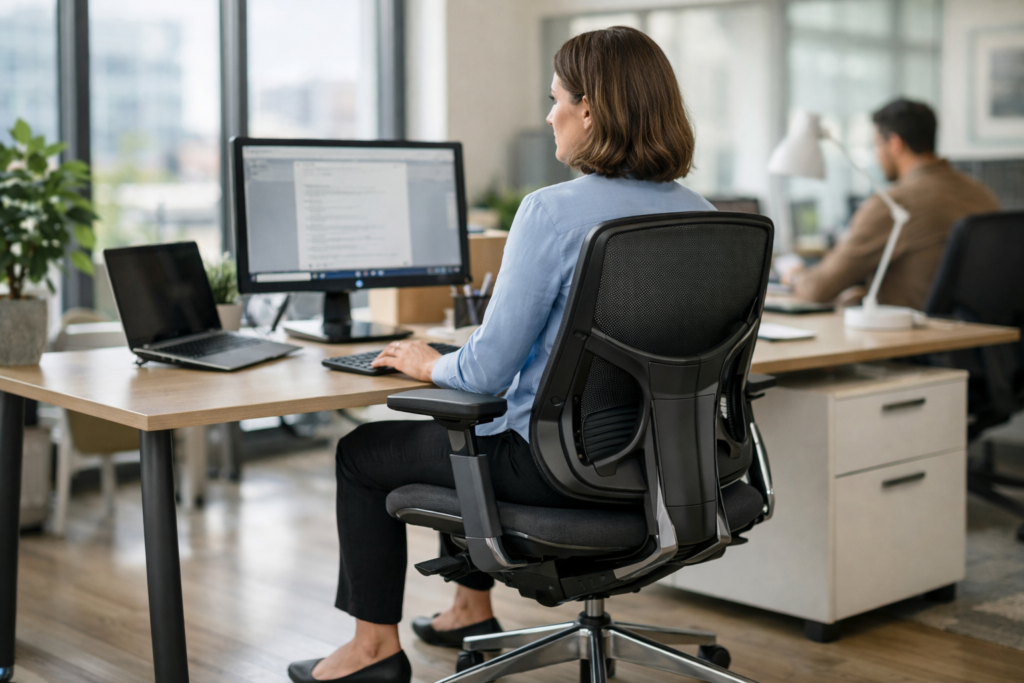
Key Takeaways
- Check fit first: a Steelcase office chair only improves posture fast if seat height, seat depth, and arm height match the body and desk. A bad fit can still leave the user reaching, shrugging, or slumping.
- Use the first 14 days as a reset period: the right ergonomic chair can reduce neck strain, hip pain, and forward shoulders as the body stops fighting the seat. It won’t fix bad desk habits by itself.
- Match the model to the person: Leap, Amia, and Think each suit different desk time, body size, and support needs. Tall users, smaller users, and people needing firmer lumbar support shouldn’t pick the same chair.
- Compare new, used, and open-box carefully: a certified pre-owned Steelcase office chair can deliver strong value without the retail hit. The real difference is condition, warranty coverage, and how well the chair was restored.
- Focus on the controls that matter: recline, swivel, seat depth, and lumbar support influence posture more than flashy extras like a headrest. For long computer sessions, adjustability beats padding.
- Read chair reviews like a buyer, not a browser: look for comments on comfort after 6 to 8 hours, support for tall or wide frames, and how the chair handles desk work. That’s where the real answer lives.
Most desk workers don’t notice posture slipping until the aches start showing up around day 10. By then, the shoulders are rounded, the hips feel pinned, and the lower back’s doing too much work. A Steelcase office chair can change that fast — not because it’s magic, but because good support stops the body from fighting itself.
Realistically, posture doesn’t “fix” overnight. But in the first 14 days, a chair with proper lumbar shape, seat depth, and recline behavior can change how a person sits for eight or more hours a day. That matters for tech pros at a computer, designers leaning in for detail work, writers living in long typing sessions, and anyone who’s tired of feeling wrecked after a workday. The right chair won’t erase bad habits on its own. It will make the better position easier to keep.
And that’s the part most people miss. A chair like this isn’t just about comfort; it’s about reducing the small failures that add up — hip pain, neck strain, lazy slouching, and that forward-head posture that creeps into every video call.
Why a Steelcase office chair can change how a desk body feels fast
Fast. Not magic. A steelcase office chair changes the feedback loop between spine, hips, — screen within days, and that’s why a good fit feels different almost immediately.
In the first 14 days, users usually notice three things: less forward slump, fewer shoulder shrugs, and a calmer lower back. A Seelcase office chair with dialed-in seat depth and tilt support can make a desk feel less like a trap and more like a working position. The Steelcase office chair for long hours matters here because 6 to 10 hours at a computer exposes every weak spot in posture. No surprise there.
The first 14 days: what posture change usually looks like in real use
Day 1 feels odd. Day 4 starts to feel normal. By day 10, the user usually stops fidgeting every 15 minutes and settles into a steadier sit (if the chair is set correctly).
A Steelcase ergonomic office chair with adjustable arms helps the shoulders drop, while a certified pre-owned Steelcase office chair keeps the price sane for buyers who’d rather spend on a desk, monitor, or swivel base. For shoppers scanning a Steelcase office chair sale, the real test isn’t the label. It’s whether the chair supports a clean pelvis angle and keeps the head from drifting forward.
Why poor desk habits show up as neck strain, hip pain, and forward shoulders
Slouching at a computer, reaching for a keyboard, or sitting too deeply in the seat puts pressure on the hips and upper back. That’s why people on Reddit keep comparing lazy, leather, and adjustable models, then asking the same puzzle: why does one chair feel fine for an hour and awful by 3 p.m.?
It’s not the only factor, but it’s close.
- Neck strain: monitor too low, arms too high.
- Hip pain: seat pan too long, or no leg relief.
- Forward shoulders: no back support, no reset.
What a proper ergonomic chair can fix—and what it can’t
A chair can’t undo a bad desk, a laptop-on-table setup, or a 10-hour sprint on secret labs and Amazon reviews alone. It can, though, reduce load, support the torso, and make better posture easier to repeat day after day. That’s the real win.
Madison Seating sees this pattern constantly: buyers compare chairs, open boxes, and used options, then realize comfort comes from fit, not hype. Tall users, especially, should check arm travel, back height, and recline before chasing a best-in-class claim from a forum thread.
Picking the best Steelcase office chair for posture, desk time, and body size
Write this section as if explaining to a smart friend over coffee — casual but accurate and specific. A Steelcase office chair can help posture in two weeks if the fit is right; if it isn’t, it just becomes expensive furniture. The best Steelcase ergonomic office chair for desk work depends on body size, sitting hours, and how often the user shifts from upright typing to a lazy recline.
Leap vs Amia vs Think: which chair fits which user
Leap is the best pick for long computer sessions, especially if the user wants live back motion and firmer lumbar control. Amia feels easier on the wallet and works well for a home office setup that needs solid comfort without extra knobs. Think keeps things simple; it suits people who don’t want to puzzle over adjustments every Monday morning.
Tall users, smaller users, and people who need stronger lumbar support
Tall users need seat depth and a taller back; smaller users need the opposite, or the chair starts pushing behind the knees. For stronger lumbar support, the Leap usually wins, while the Amia fits shorter torsos better. A certified pre owned Steelcase office chair can still deliver that fit if the size is right.
Swivel, recline, headrest, and seat depth: the adjustments that matter most
- Seat depth: 2 to 3 fingers behind the knees is the target.
- Swivel: matters more than people think for desk reach and shoulder strain.
- Recline: A mild recline beats frozen upright sitting.
- Arms: a Steelcase office chair with adjustable arms keeps wrists and traps happier.
For buyers scanning a Steelcase office chair sale, the smart move is to compare fit first and price second. Madison Seating’s certified pre-owned Steelcase office chair options are worth a hard look if the goal is real support, not showroom fluff.
For a Steelcase office chair for long hours, fit beats brand hype every single time.
How to set up a Steelcase office chair for better posture on day one
A Steelcase office chair won’t fix posture by magic.
Set up matters more than the logo. A chair can be the best ergonomic chair in the room and still feel lazy if it’s dialed wrong.
- Seat height: set the hips just above the knees, then keep feet flat. For keyboard work, elbows should sit near 90 degrees, with the desk close enough that shoulders don’t creep up.
- Arm height and desk alignment: on a Steelcase office chair with adjustable arms, lower the arms until forearms rest lightly while typing. If the desk is high, raise the chair and add a footrest; don’t shrug through a full day at the computer.
- Backrest use: recline a few degrees and keep the pelvis back in the seat. That’s how a Steelcase ergonomic office chair supports the spine without the user collapsing into a C-shape. Not a lounge pose. Just enough movement to unload the lower back.
Realistically, a Steelcase office chair for long hours works best when the sitter changes positions every 30 to 45 minutes. A certified pre-owned Steelcase office chair from Madison Seating can handle that pattern if the controls are set right, and a Steelcase office chair sale only helps if the fit is right first.
Common mistakes are simple: seat too low, armrests too high, and recline locked upright all day. That combo is why a good chair ends up feeling like office furniture from the depot instead of a real support tool. Tall users, especially, should check seat depth before blaming the chair.
Is a Steelcase office chair worth it for home office and work-from-home setups?
About 7 out of 10 desk workers notice posture drift within the first 90 minutes on a cheap task chair, and that’s why a Steelcase office chair gets attention fast. It isn’t about luxury. It’s about keeping the pelvis from sliding, the shoulders from creeping up, and the lower back from doing all the work.
New vs used vs open-box: what changes the value equation
A new chair gives full warranty coverage, but the price jump can be hard to swallow. A certified pre-owned Steelcase office chair often lands in the sweet spot: real Steelcase build quality, lower cost, and less waste. For buyers watching a Steelcase office chair sale, open-box and certified pre-owned options can make more sense than chasing retail markdowns.
Why premium chairs beat cheap furniture for long computer sessions
A Steelcase office chair with adjustable arms and proper seat depth does more than feel better. It keeps forearms level for typing, reduces neck strain, and helps a Steelcase office chair for long hours stay comfortable through a 6- to 10-hour stretch. Cheap furniture tends to feel fine for 20 minutes, then turns lumpy. The seat caves, the back reclines badly, and the posture goes sideways.
Where people compare chair options online before buying
Buyers usually read a review, scan Reddit threads, and compare notes against Amazon, Staples, Walmart, or Office Depot listings before they spend real money. A Steelcase ergonomic office chair keeps showing up in those searches for one reason: it solves the desk problem better than most look-alikes. Madison Seating often enters the conversation here, especially for people who want value without betting on a mystery used chair. The honest answer is simple. For a work-from-home setup, it’s one of the few purchases that can pay off every single day.
What to look for before buying a Steelcase office chair online
Can a Steelcase office chair improve posture in 14 days? Usually, yes — if the fit is right and the setup isn’t lazy. A good Steelcase office chair should support the pelvis, keep the screen at eye level, and let the shoulders drop instead of creep up.
Fit checks for tall users, wide frames, and recurring back pain
For tall users, check seat depth first. If the pan cuts into the knees after 20 minutes, keep looking. Wide frames need real seat width, not padded arms that steal space, and recurring back pain calls for firm lumbar support plus a Steelcase office chair with adjustable arms so the forearms stay level. A Steelcase ergonomic office chair isn’t about plush foam; it’s about alignment during a 6- to 10-hour desk day.
What should a good office chair review say about comfort and support?
Real reviews talk about reclining tension, headrest use, swivel feel, and whether the chair still feels stable after a full workweek. If someone only mentions it looks like an office chair beside a computer, that’s fluff. A strong review should say how the chair handled long hours, whether the backrest fought slouching, and if the fit worked for a tall body or a wide frame. That’s the stuff that matters.
Return policies, warranty coverage, and why certified pre-owned matters
A Steelcase office chair sale can save real money, but the return window matters more than the price tag. Look for at least 30 days, clear warranty terms, and proof the chair was inspected. A certified pre-owned Steelcase office chair gives access to premium furniture without paying retail, and Madison Seating is one source that sells restored inventory with that angle in mind. For buyers comparing a Steelcase office chair for long hours against something open-box or used, that extra verification is the difference between a deal and a headache.
Frequently Asked Questions
Is Steelcase a good chair brand?
Yes. A Steelcase office chair is one of the safest buys for people who sit at a desk all day, especially if they want real adjustability instead of foam and marketing copy. The Leap, Amia, and Think all solve the same basic problem in different ways, and they do it well.
Which Steelcase chair is best for scoliosis?
There isn’t one magic chair, but the Leap is usually the strongest pick because its back moves with the body — the seat depth, lumbar firmness, and arm settings give a lot of control. For some people, the Amia works better if they want a simpler setup with a softer feel. Scoliosis is personal, so fit matters more than brand names.
Can an office chair cause hip pain?
Absolutely. A seat that’s too deep, too low, or too hard can press into the hips and the back of the thighs, and after 6 to 8 hours, that starts to show up as pain. A properly sized Steelcase office chair reduces that pressure by letting the user set seat depth, height, and recline the right way.
What is the Rolls-Royce of office chairs?
People usually mean the Herman Miller Aeron or a top-end Steelcase office chair like the Leap. If the question is about support and long-session comfort, the Leap gets a strong case because it feels active and lets the spine move instead of locking the body in place. The better question is which chair fits the user’s body and work style.
Is a Steelcase office chair better than a gaming chair?
For long computer sessions, yes, most of the time. Gaming chairs often look dramatic but they usually rely on cushions and shape, not real adjustment range. A Steelcase office chair is built for desk work, typing, mousing, and repeated posture changes, which is where fatigue shows up first.
Let that sink in for a moment.
Should tall users look at Steelcase chairs?
Definitely. Tall users often struggle with shallow seats, short backrests, and armrests that sit too low, and that’s where a Steelcase office chair can make a real difference. The Leap usually handles taller bodies best, but seat depth and back height should still be checked before buying.
Can you buy a used Steelcase chair safely?
Yes, if it’s inspected and backed by a real warranty. Used chairs can be a smart buy because the frame, mechanism, and fabric on premium Steelcase chairs are usually built to last for years, not months. The key is avoiding random marketplace deals with no parts support and no return path.
How does the Steelcase Amia compare with the Leap?
The Amia is simpler and friendlier for people who don’t want to tweak 12 settings. The Leap gives more control and usually wins for users who sit longer, shift positions often, or need firmer back support. Both are serious ergonomic chairs; the choice comes down to how much adjustability the user wants.
What should a buyer check before choosing a Steelcase office chair?
Three things: seat depth, lumbar feel, and armrest range. If those are wrong, even the best chair feels off in under an hour. After that, look at the user’s height, desk setup, and how many hours they’re actually sitting each day.
Is a Steelcase office chair worth the price?
If the chair replaces a cheap model every year or two, yes. A premium chair costs more up front, but it usually beats the false economy of buying something that sags, wobbles, or tears after 18 months. For anyone spending 8 to 10 hours a day at a computer, that math gets pretty simple.
A Steelcase office chair won’t fix bad habits by magic, and it won’t erase years of slouching in two lunch breaks. What it can do, fast, is stop the daily grind that keeps posture from holding steady: seat depth that’s wrong, armrests that sit too high, and a backrest that never really meets the spine where it needs to. That’s the real 14-day story. Better support. Less fighting the chair. More room for the body to settle into a cleaner position.
Leap, Amia, and Think each solve a different problem, and the right pick depends on body size, desk time, and how much adjustability the user will actually touch. A good setup matters just as much as the model. Miss the height or the recline angle, and even a premium chair can feel off. Get it right, and the difference shows up in the shoulders, hips, and energy level before the second week is over.
The next step is simple: measure the user, check the desk height, and compare chair specs against those numbers before buying the first steelcase office chair that looks right on screen.