Key Takeaways
- Prioritize correct Herman Miller Aeron desk chair sizing before price or finish, because size A, B, and C change seat depth, back contact, and arm position in ways that shape all-day office comfort.
- Check workstation fit, not just chair specs: a Herman Miller Aeron desk chair that’s too tall, too deep, or too wide can throw off keyboard height, foot pressure, and monitor position at the desk.
- Compare cost per year instead of sticker price, since a well-fitted ergonomic office chair often outlasts cheaper chairs that need replacing every 18 to 24 months.
- Match adjustable features to real use, including lumbar support, arm movement, tilt control, and caster type for computer work, gaming, and standing desk setups.
- Standardize team buying with a simple fit checklist, so office managers can choose the right desk chair size for most staff and cut down on bad purchasing decisions.
- Watch for hidden layout issues under the desk — drawers, shelf clearance, corner placement, and foot rest needs can all affect whether a Herman Miller Aeron desk chair actually fits the workspace.
One bad sizing decision can turn a premium chair into a daily complaint in less than a week. That’s why the Herman Miller Aeron desk chair still creates so much debate among buyers who already know the model by name but haven’t pinned down the right fit. Price gets the attention, sure—but size is what decides whether someone sits with steady lumbar support or spends eight hours shifting, perching, and blaming the desk.
In practice, operations teams usually spot the problem after the rollout, not before. A chair that looks fine in a product photo can sit too deep under a computer desk, push shorter users forward, or leave taller staff without enough back support where it counts. And once that starts happening across five, ten, or twenty workstations, the costs stack up fast—more adjustment requests, more swap-outs, more low-grade discomfort that chips away at focus. The honest answer is that sizing still matters because work hasn’t gotten simpler. People move between office days and home setups, between keyboard work and calls, between seated tasks and a standing desk. The chair has to keep up. If it doesn’t, the whole workstation starts to drift out of line (and people feel it by lunchtime).
Herman Miller Aeron desk chair sizing is still the first buying decision that shapes comfort
About 70% of adults fit size B, yet that still leaves nearly 1 in 3 people in the wrong seat if they buy by popularity instead of body fit. That mistake shows up fast in a herman miller aeron desk chair—not in the first five minutes, but by hour three at the computer.
Why do sizes A, B, and C change seat depth, back fit, and arm position
Size changes more than width. In a herman miller aeron work chair, seat depth, back height, and arm position all shift with the frame, which affects lumbar contact, foot placement, and elbow height at the desk.
- Size A: better for shorter users who need less seat depth
- Size B: the default fit for most office setups
- Size C: better for taller users who need more thigh support
A badly matched herman miller aeron lumbar chair can push the body into a forward perch—or leave too much gap behind the knees.
How bad sizing shows up during computer work, gaming, and long office days
Bad fit is sneaky. During computer work, gaming, or long office sessions, the wrong size often leads to shrugged shoulders, dangling legs, or a foot rest added just to make the chair usable. Even a Herman Miller headrest won’t fix a seat pan or back shape that misses the user’s frame.
Most people skip this part. They shouldn’t.
The hidden cost of getting the desk chair size wrong for a growing team
For a growing team, sizing mistakes turn into replacement requests, productivity dips, awkward desk pairings with standing desks, drawers, and accessories. A Herman Miller Aeron side chair might suit a touchdown space, but task seating needs closer fit control. That’s why Herman Miller office chairs for value-conscious teams should be chosen by body range, not just price or looks.
Why the Herman Miller Aeron desk chair still stands out in the ergonomic office chair market
An office manager replaces eight budget chairs after just 18 months of daily computer use. Two quarters later, the team is still talking about one model by name: the Herman Miller Aeron desk chair. That pattern says a lot about how buyers make a desk seating decision.
The reason is simple. This chair built a reputation around fit, not hype, and sizing still shapes comfort, lumbar support, posture, and daily output at the desk.
The mesh design, lumbar support, and adjustable controls keep it relevant
The Herman Miller Aeron work chair stays relevant because its mesh back and seat manage heat better than thick foam during long office sessions, while adjustable arms, tilt, and height controls let teams match the chair to the person—not the other way around.
A proper Herman Miller Aeron lumbar chair setup supports the lower back, keeps feet flat with or without a foot rest, and helps workers switching between a standing desk and seated tasks avoid the slumped posture common in generic chairs.
Experience makes this obvious. Theory doesn’t.
How the Aeron compares to foam office chairs for heat, posture, and daily desk use
Foam chairs can feel soft for 20 minutes. After six hours, heat buildup — compression usually tells a different story. The Herman Miller Aeron desk chair holds its shape better—especially for teams sharing one office setup—and that matters more than a padded first impression.
- Heat control: mesh breathes better than foam
- Posture: firmer support reduces sink-in slouching
- Adjustment range: better for mixed-height users
Why buyers still search for this chair by name instead of browsing generic office chairs
Buyers rarely search for this specifically unless the product solves a real problem. They look for the Herman Miller Aeron side chair, compare a Herman Miller headrest, and price out Herman Miller office chairs for value-conscious teams because they want predictable ergonomics, lower replacement cycles, and fewer complaints from staff. Not flashy. Just proven at the desk.
Is the Herman Miller Aeron desk chair worth it for budget-conscious office buyers?
Is the higher price hard to justify on a tight office budget? Yes, but the honest answer is that a Herman Miller Aeron desk chair often costs less over five years than cycling through cheaper chairs that fail every 18 to 24 months.
Cost per year versus replacing cheaper chairs every 18 to 24 months
A $300 task chair replaced three times in six years turns into a $900 spend, which total still ignores setup time, disposal, and lost work while someone shops for a new desk chair. By contrast, a Herman Miller Aeron work chair is built for long office use, with adjustable arms, height control, and shaped mesh support that doesn’t flatten like foam seats under daily computer work.
What operations teams should measure: comfort complaints, downtime, and replacement cycles
Operations teams should track three numbers—comfort complaints, downtime tied to seating issues, and average replacement cycle. If seven employees report lumbar or leg discomfort in one quarter, the chair problem is already costing money. For buyers comparing options, the Herman Miller Aeron lumbar chair is usually judged on support consistency, not just sticker price.
- Comfort tickets per 10 employees
- Hours lost to workstation changes
- Chair’s life spanned before replacement
Where the Aeron fits between executive seating, gaming chairs, and basic task chairs
The Aeron sits in a useful middle lane—less bulky than executive seating, more work-focused than gaming chairs, and far more refined than a basic office stool or side chair. A Herman Miller Aeron side chair, it isn’t; this is a daily-use ergonomic desk chair. Teams that ask about a Herman Miller headrest or compare Herman Miller office chairs for value-conscious teams are usually trying to balance support, standing desk setups, and long replacement cycles. That’s the real buying decision.
How to choose the right Herman Miller Aeron desk chair setup for real workstations
Think fit first. A Herman Miller Aeron desk chair works best when the size matches the body and the desk, not just the room. For most teams, size B covers the widest range, but leg length under the desk matters as much as height—if the seat front presses the back of the knees, posture and circulation slip fast.
Matching chair size to user height, weight, and leg length under the desk
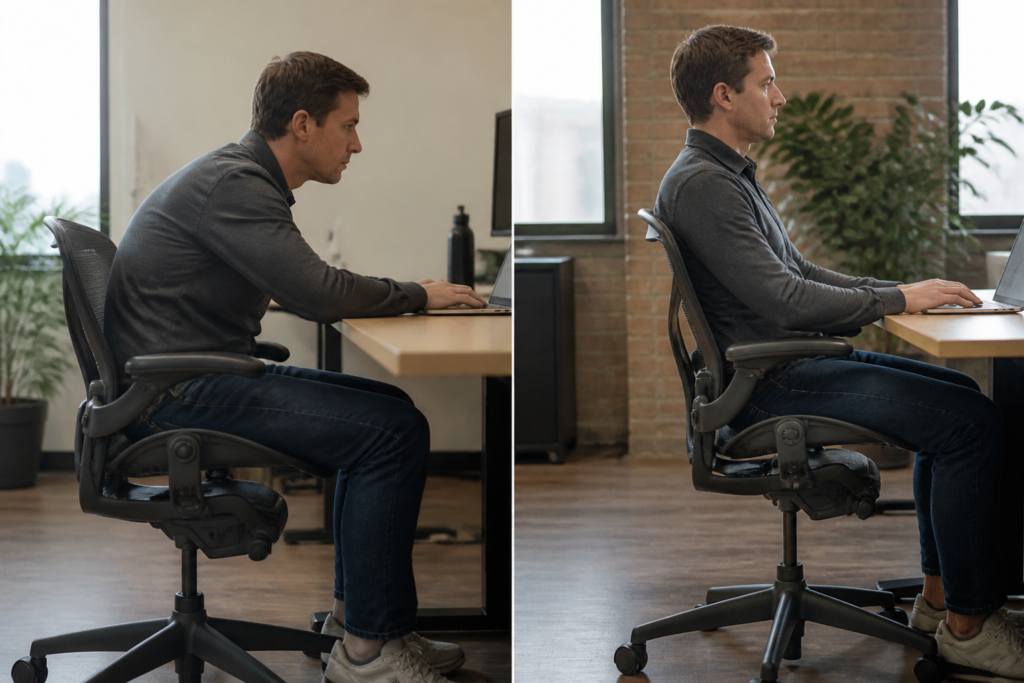
The practical check is simple: feet flat, knees near 90 degrees, and 2 to 3 fingers of space behind the knee. That’s how a Herman Miller Aeron work chair stops feeling too deep or too short during a full computer day. For a tighter office, even a herman miller aeron side chair can make sense in touch-down areas.
Picking adjustable arms, lumbar support, and tilt settings for desk and standing desk use
Adjustment range matters more than feature count. At a standing desk, quick-reset settings help shared users switch from sit to stand without wasting 5 minutes each time. And yes—a Herman Miller headrest helps only for reclined reading, not primary desk work.
Choosing casters, foot rest options, and accessories that improve workstation fit
Small parts change the feel of the whole setup:
- Soft casters for hard floors
- A foot rest for shorter users
- Arms that clear drawers and corner desks
What to check if the chair will be shared across shifts or hybrid office schedules
Shared seating needs fast adjustments, clear labels, and durable controls—full stop. That’s why Herman Miller office chairs for value-conscious teams are usually chosen by configuration, not color or gaming looks (white mesh and wood accents can wait).
The difference shows up fast.
A poorly sized Herman Miller Aeron desk chair can throw off the whole workstation
Bad sizing changes posture fast.
- Seat height shifts keyboard reach, monitor sightline, and foot pressure.
- Desk clearance decides whether arms stay relaxed or shoulders climb.
- Room layout changes what size chair can actually work.
How seat height affects keyboard position, monitor height, and foot pressure
A Herman Miller Aeron desk chair that sits even 1 inch too high can leave legs hanging under the desk, which raises pressure under the thigh and pushes users to perch forward at the computer.
In practice, a Herman Miller Aeron work chair should let feet stay flat, elbows rest near 90 degrees, and the screen land at eye level without stacking books under the stand. Add-ons matter too—a herman miller headrest can help reclined work, but it won’t fix poor base height.
Why desk depth, shelf clearance, drawers, and corner layouts matter more than buyers expect
Desk depth gets missed. A shallow desk with a back shelf, under-desk drawers, or a corner return can block recline — knee space—especially in an office built around a standing desk converter, gaming setup, or extra accessories.
The common mismatch between chair sizing and vanity, wood, white, or tiny office setups
Buyers often choose by looking first: white desk, wood legs, vanity profile, tiny room. But a Herman Miller Aeron lumbar chair still needs room behind the body and under the worksurface, and a Herman Miller Aeron side chair won’t solve full-day desk use. For budget planning, Herman Miller office chairs for value-conscious teams make more sense when size is matched to the workstation—not just the floor plan.
What small companies should know before sourcing Herman Miller Aeron desk chairs at scale?
Bulk chair buys go wrong fast.
Teams want speed, finance wants control, and sizing errors turn a smart office purchase into weeks of swaps. The answer is simple: treat fit like a rollout standard, not a last-minute desk accessory decision.
The best way to standardize sizing for teams without slowing down purchasing
A small company can standardize a Herman Miller Aeron desk chair rollout by using one short intake form before any order is placed. In practice, three data points do most of the work—user height, weight range, and daily computer hours.
For most teams, Size B covers roughly 7 out of 10 users, which keeps purchasing moving. But a Herman Miller Aeron work chair plan should still flag outliers, especially taller staff, petite users, and anyone already using a footrest at a standing desk setup.
When one chair model works across departments and when it doesn’t
One model can work across departments if tasks are similar and staff spend 6 to 9 hours at a desk. That’s usually true for finance, support, and admin teams—but not always for design, executive offices, or shared touchdown areas where a Herman Miller Aeron side chair may fit better than a full task chair.
Not complicated — just easy to overlook.
Buyers also need to separate extras from needs. A Herman Miller headrest can help in reclined screen-viewing roles, while a Herman Miller Aeron lumbar chair setup matters more for staff with long seated stretches and tight height adjustability needs under fixed desks or wood worktops.
How office managers can reduce returns and bad chair decisions with a simple fit checklist
Smart teams use a short fit checklist before approval:
- Seat height: feet flat, legs at about 90 degrees
- Seat depth: 2 to 3 fingers behind the knee
- Arm position: shoulders relaxed while typing
- Lumbar support: back contact without forced arching
And one more thing: purchasing teams should document who needs standard task seating and who needs exceptions—gaming-style preferences, stool use, corner desks, or special accessories can distort the choice. That’s why more buyers are reviewing herman miller office chairs for value-conscious teams before placing larger orders.
What people looking for a Herman Miller Aeron desk chair usually want right now
About 74,000 searches a month point to one blunt reality: most people typing Herman Miller Aeron desk chair aren’t browsing for fun. They’re close to a decision, and they usually need the right size fast—before they spend office budget on the wrong fit.
Navigational intent means the reader is close to a buying decision, not early research
A navigational search behaves differently from broad ergonomic research. Someone searching a herman miller aeron work chair is usually comparing a live product page, checking price context, or confirming whether that desk chair fits a home office, computer setup, standing desk station, or gaming room.
Realistically, these buyers want clear answers:
- Which size fits height and legs best
- Which adjustments matter for daily lumbar support
- What features change comfort over 8-hour use
The product details that deserve priority on the page: size, adjustments, support, and price context
The page should put fit before marketing. A herman miller aeron lumbar chair only works if seat height, arm width, and back support match the body—not just the desk. And if a buyer is also checking a Herman Miller headrest, that often signals longer computer sessions or executive-style recline use.
This is the part people underestimate.
Price context matters too. For value-minded teams, Herman Miller office chairs for value-conscious teams should be framed against replacement cycles, not sticker shock alone.
Why a sizing-focused guest post answers the real question behind most branded chair searches
Here’s what most people miss: branded search often hides a fit question. Even odd comparisons—like a Herman Miller Aeron side chair versus a full adjustable task chair—usually come back to workspace limits, foot rest use, drawers under the desk, or whether the chair will work beside a shelf, stool, white vanity, wood corner desk, or tiny office. Size first.
Frequently Asked Questions
Is the Herman Miller Aeron desk chair really worth it?
For people who sit 6 to 10 hours a day, yes. The Herman Miller Aeron desk chair costs more up front, but its adjustable lumbar support, mesh back, and long service life usually beat buying a cheaper office chair every two years. That math matters on a controlled budget.
What chair is good for fibromyalgia?
A good ergonomic desk chair for fibromyalgia should reduce pressure points, keep the spine supported, and let the user shift posture often. The Herman Miller Aeron desk chair works well for some people because the mesh seat spreads weight evenly and the recline moves smoothly, — comfort is personal—seat depth, arm height, and lumbar fit matter more than brand hype.
Why is the Herman Miller Aeron so expensive?
Because it isn’t built like a bargain office chair from a big online marketplace. The Herman Miller Aeron desk chair uses a tensioned mesh system, precise adjustable controls, strong materials, and sizing options that fit different body types, which is a big jump from a basic computer chair, gaming chair, or executive chair with foam that flattens fast.
What is the best chair for spinal fusion?
There isn’t one best chair for every spinal fusion patient. In practice, a strong option is an ergonomic office chair with stable lumbar support, adjustable arms, controlled recline, and the right seat height so feet rest flat or on a foot rest—because spinal alignment and pressure control are the real issues, not flashy accessories.
What size Herman Miller Aeron desk chair should most teams buy?
Size B is the safe default for most offices because it fits the widest range of users. But here’s what most people miss: if a team includes shorter staff under about 5’3″ or taller users over 6’2″, a one-size decision can backfire—A or C may be the better fit for those seats.
Think about what that means for your situation.
Is the Herman Miller Aeron desk chair good for standing desk setups?
Yes, if the chair height, arm position, and monitor level are set correctly. A standing desk doesn’t remove the need for good sitting posture, and the Aeron can pair well with a sit-stand desk, foot rest, and monitor stand for people who alternate between standing and computer work all day.
Can the Herman Miller Aeron desk chair help with lower back pain?
It can help, and for some users it helps fast. The shaped back, lumbar support options, and adjustable recline encourage better posture — no chair fixes pain on its own—bad desk height, poor keyboard placement, and zero movement breaks will still wreck a workday.
Is the Herman Miller Aeron desk chair good for gaming, too?
Yes. A lot of people shopping for gaming chairs end up happier in an ergonomic office chair because long sessions at a desk demand support, airflow, and arm adjustment more than racing-seat styling. Bluntly, comfort over eight hours beats looks after the first week.
What should buyers check before choosing a Herman Miller Aeron desk chair?
If the desk is white, wood, corner, or compact, measure leg clearance, drawer space, and whether a foot rest or under-desk accessories will block movement—small setup mistakes create big comfort problems.
That’s the part buyers miss most: the right chair choice doesn’t start with color, price tag, or a list of features. It starts with fit. A herman miller aeron desk chair that’s sized well can support better arm position, cleaner leg clearance under the desk, — fewer posture breakdowns by hour three or four of the workday. Get the size wrong, and the rest of the workstation starts compensating — keyboard height, monitor position, even foot pressure on the floor.
For small teams, that sizing decision carries budget weight too. One good seating standard can cut down on comfort complaints, reduce replacement churn, and keep purchasing from turning into a string of expensive corrections. And the Aeron still holds attention for a reason: the mesh seat and back, support options, and adjustment range make it a serious work chair, not just a status buy.
The next move should be practical. Measure the users, check desk clearance, and build a one-page fit checklist for size A, B, and C before ordering a single chair — especially if the purchase covers more than one workstation.