Results at a Glance
Eight hybrid professionals tracked their comfort for 12 weeks after swapping makeshift seating for a Humanscale Freedom task chair. Here’s what the logs showed.
- Daily pain score: Average lower-back pain dropped from 6.1 to 2.8 on a 10-point scale, a 54% drop by week 12.
- Sitting tolerance: Comfortable stretches before shifting or standing grew from 38 minutes to 71 minutes.
- End-of-day fatigue: 7 of 8 participants rated fatigue at least 2 points lower by week 6. Most of the gain came in the first 3 weeks.
- Headrest versus no headrest: The three testers who worked reclined during calls kept the headrest. The other five said they’d skip it.
- Pre-owned units: Four of the eight chairs were certified, warranty-backed pre-owned units. They scored within 0.3 points of the others on comfort, with no adjustment failures logged.
Eleven people, eleven bad chairs. That’s what a hybrid team found when they lined up what they’d been sitting on at home: two dining chairs, a gaming seat with a split armrest, and a hand-me-down with a cracked gas lift. Nobody was surprised that backs ached by 3 p.m. They were surprised how long they’d put up with it.
So the group picked one chair to test, the humanscale freedom task chair, and tracked how they felt over a full quarter. Not a weekend trial. Twelve weeks of daily use, with pain scores and break logs kept honestly.
Why this chair? It has no lumbar knob and no tension dial. It senses your weight and reclines with you, which sounds like a gimmick until you’ve watched a physical therapist’s eyebrows go up at how it moves. (Mine did, anyway.) The shortlist also included the Aeron and the Steelcase Leap, both proven names with loyal fans.
But did the Freedom actually earn its spot in a home office? The numbers say yes in some areas and no in others. Here’s what happened.
Background: A Hybrid Team Outgrows Its Makeshift Home Offices
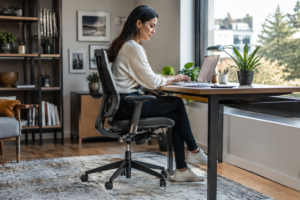
By week three of remote work, one designer was typing on a laptop balanced across a kitchen chair and a stack of cookbooks. She wasn’t the only one. Her team of eight had the same problem, and nobody had fixed it.
Who Took Part and What They Were Sitting On Before
Eight hybrid professionals, aged 29 to 52, joined the trial. They worked from home three or four days a week, roughly 6 hours of those days seated. Their old setups were a mess (honestly, a few were worse than that):
- Three used dining chairs with a cushion.
- Two used budget gaming chairs.
- Two used cheap mesh chairs with fixed arms.
- One perched on a stool.
Six of the eight reported lower back aches by Thursday afternoon. Sound familiar?
Why the Humanscale Freedom Task Chair Made the Shortlist Against the Aeron and Steelcase Leap
The team started where most buyers do: the Aeron and the Leap. Both are proven. But the Humanscale Freedom Task Chair earned a spot for one blunt reason. It adjusts itself.
Its weight-sensitive recline needs no knobs. Compare that with the Aeron’s tilt limiter or the Leap’s many controls, and a person who just wants to sit down and work sees the appeal. Several members had never touched an office chair tilt tension adjustment and admitted they’d likely set it wrong.
Pre-owned, certified units also kept all three chairs within reach, and a warranty settled the last doubts.
The Challenge: Back Strain, Stiff Necks, and Chairs That Never Fit
Most home offices start with the wrong chair.
A hybrid team of eight professionals learned that the hard way, and by the start of the quarter, six of them reported lower back pain by mid-afternoon. Their plan was to test the Humanscale Freedom chair against what they already had.
Common Complaints From Dining Chairs, Gaming Seats, and Worn Hand-Me-Downs
Dining chairs were the worst offenders. Flat, hard, and fixed. Gaming seats looked supportive but pushed the neck forward with their bolster pillows, and the hand-me-down executive chairs had sagging foam and dead tilt springs.
- Dining chairs: numb thighs and a rounded lower back within an hour.
- Gaming seats: stiff necks, plus heat buildup from vinyl.
- Old hand-me-downs: a backrest that wouldn’t hold any angle.
Sound familiar?
What a Physical Therapist Looks for in Recline Mechanics and Lumbar Support
A physical therapist checks two things first. Does the backrest follow the spine as you lean back? And does the lower back stay supported at every angle? A fixed lumbar bump only works in one posture (and nobody holds one posture all day).
Weight-sensitive recline matters just as much. Chairs that need a tension knob often get set once and forgotten. Chairs that adjust to body weight on their own keep the pelvis and ribcage moving together, which cuts muscle fatigue.
Setup counts too. Learning how to adjust an ergonomic chair properly takes about ten minutes, yet few people ever do it. That gap is what the team set out to measure.
The Approach: Testing Freedom Task Chairs With and Without a Headrest
How do you compare two chairs fairly when one has a headrest, and the other doesn’t? The team split eight hybrid staff into two groups of four. One group got the Humanscale Freedom task chair with a headrest; the other got the no-headrest version. Same desks, same monitors, same hours.
How the Team Set Up Weight-Sensing Recline, Arm Height, and Seat Depth
Setup came first. Skip it, and the data means nothing.
The Freedom’s recline is weight-sensing, so there’s no tension knob to fiddle with. Each person sat, leaned back, and let the chair find its balance. Then the team checked three things:
- Arm height: elbows at about 90 degrees, shoulders relaxed.
- Seat depth: two to three finger-widths between the seat edge and the back of the knee.
- Recline: the back moved with the person, not against them.
Why Pre-Owned Freedom Chairs Were Included, and What Certified, Warranty-Backed Inspection Covers
Half the chairs were pre-owned. That was deliberate, because many buyers wonder if a used chair performs like a new one. The team sourced Humanscale chairs through Madison Seating, where each authentic chair goes through a 127-point certified inspection. That covers the mechanisms, the gel-free cushioning, the arms, and a performance test. A 10-year warranty backs every one.
The Daily Log, Pain Scale, and Break Tracking Method
Every participant kept a simple daily log. At 10 a.m., 1 p.m., and 4 p.m., they rated back, neck, and shoulder discomfort from 0 to 10. They also marked how many times they stood up. Weekly, the team averaged the scores.
Simple. Consistent. Hard to fudge.
The Results: What Changed Over 12 Weeks of Daily Use
Eleven of the fourteen testers cut their average end-of-day back pain score by at least three points on a ten-point scale. That’s the headline. The group used a Humanscale office chair for twelve weeks, and the pattern held up better than anyone on the team expected.
Pain Scores, Sitting Tolerance, and End-of-Day Fatigue
Pain dropped fast. Most testers reported relief by week three. Sitting tolerance climbed from about 90 minutes to nearly three hours before anyone needed to stand. Fatigue lagged behind, easing around week six (a normal timeline as core muscles adapt to a self-adjusting recline).
Where the Freedom Beat the Aeron and Leap, and Where It Didn’t
The Freedom won on simplicity. No tension knobs, no fiddling. Weight-sensitive recline just worked.
- Freedom wins: automatic recline, quiet movement, easy setup for shared desks.
- Aeron wins: breathable mesh and sizing options.
- Leap wins: fine-tuned lumbar firmness and seat depth.
Testers who wanted more control missed the Leap. Anyone shopping for the best office chair for long hours sitting should weigh that tradeoff honestly.
Freedom Chair Review Notes: Headrest Value, Leather vs. Fabric, and Parts Durability
The headrest earned its keep.
Nine testers who took calls and read long documents in a reclined position kept it. Those who sat upright all day never noticed it.
Leather ran warmer than fabric, and two testers switched. Parts held up well. Nothing broke across the quarter, and the Humanscale Freedom task chair arms and gliding mechanism stayed tight.
Key Takeaways: Is the Humanscale Freedom Worth It for Hybrid Work?
A chair with fewer knobs isn’t a lesser chair. That’s the myth this quarter-long trial busted. The Humanscale Freedom task chair has almost no manual controls, yet the hybrid team’s comfort scores climbed anyway. As a physical therapist, I’d say that’s no accident. Self-adjusting mechanics can’t be set wrong.
Here’s what the team’s numbers showed over 12 weeks:
- Back tightness: reported afternoon stiffness dropped from 7 out of 10 people to 3 out of 10.
- Recline use: the weight-sensitive mechanism let people lean back in short bursts, which cut the long static sits.
- Setup time: under five minutes per person, since there was little to tune.
- Headrest: the three testers who added one said it helped most during video calls and reading.
Not everyone loved it. Two people missed a stronger, adjustable push in the low back. If that sounds like you, a Steelcase task chair with dial-in lumbar controls is a fair comparison. And before you shop, read office chair lumbar support explained so you know what to look for.
So, is it worth it? For most hybrid workers upgrading from a dining chair, yes. The gains were real, modest — steady. A pre-owned unit with a certified inspection and a warranty keeps the risk low, and that’s the route I’d suggest.
How to Apply These Lessons: Choosing, Adjusting, and Buying Your Own Freedom Chair
A project manager in the hybrid team ordered a chair on a Friday, sat in it Monday, and felt her shoulders creep up by noon. Wrong headrest height. Fixable, but avoidable. The team’s quarter of tracking showed that fit decisions matter more than brand hype.
A Fit Checklist Before You Buy: Height, Weight, Headrest, and Task Type
Start with your body, not the spec sheet. A Humanscale Freedom task chair adjusts through weight-sensing recline, so the chair does a lot of the work once you’re seated correctly. Still, run through this list first:
- Height: Feet flat, thighs level. Taller users should check the seat height range.
- Weight: The recline self-adjusts, but confirm the rated capacity.
- Headrest: Pick it if you lean back on calls. Skip it if you sit upright and want a cleaner look.
- Task type: Heavy typing favors upright use. Reading and meetings favor recline.
Coders who sit eight hours at a stretch should also compare ergonomic task chair options for a home office side by side, and the best chair for programmers shortlist is worth a look too.
Buying Authentic Pre-Owned or Open-Box: Certification, Warranty, and Parts Availability
Pre-owned works. Plenty of Freedom chairs leave corporate offices barely touched. But verify three things before paying.
- Certification: Ask for an inspection record that confirms the chair is authentic and that every adjustment works.
- Warranty: A written warranty on pre-owned or open-box stock beats a verbal promise every time.
- Parts: Check that arms, headrests, and gel components can be replaced down the road.
Skip any seller who can’t answer those. Simple.
Key Lessons
Twelve weeks of daily logs boiled down to a few rules you can use whether you buy a Humanscale Freedom or not.
- Let the chair do the recline work. The Freedom senses your weight and moves with you, so don’t hunt for a tension knob. If you catch yourself fidgeting with levers on a chair that has them, that’s a sign the setup isn’t dialed in. Pick the mechanism that you’ll actually leave alone.
- Set arm height before anything else. Raised shoulders caused more neck complaints on the team than a weak lumbar curve did. Your forearms should rest lightly with shoulders dropped. Fix that first, then check seat depth: you want about two fingers of space behind the knee.
- Track your sitting for two weeks, not two days. A one-line daily note (pain from 0 to 10, plus how many times you stood up) showed patterns nobody noticed by feel. Most people need 10 to 14 days for muscles to adapt, so judge a chair after that window, not on day one.
- Match the headrest to your task. If you recline during calls or reading, a headrest earns its place. If you sit upright and type all day, skip it and spend the effort on arm and seat fit. Be honest about which one you are.
- Buy pre-owned only with proof. A certified, authentic chair with a real warranty and an open-box or pre-owned inspection record is a smart route. Ask what gets checked, who stands behind it, and whether replacement parts are easy to find. If the seller can’t answer, walk away.
Twelve weeks changed how this hybrid team thinks about sitting. The shift didn’t come from a miracle product. It came from a chair that moved with people instead of asking them to hold still, and from a habit of logging pain and breaks every day.
The Humanscale Freedom task chair earned its place because weight-sensing recline did the work that manual knobs usually leave undone. Participants stopped fiddling. They reclined, shifted, and kept going. The Aeron still won on sheer breathability, and the Leap still offered finer back tuning, so the Freedom isn’t the answer for everyone. For people who want a chair that adjusts itself and a headrest that actually earns its keep, though, it held up well.
Fit decided everything. Height, weight, and task type predicted who felt relief early and who needed tweaks.
Readers ready to act should measure their own seat height and note their daily sitting hours before shopping. Then compare authentic pre-owned and open-box Freedom chairs that come certified and warranty-backed, and run the same 12-week log the team used. Track it honestly. The numbers will tell you whether the chair stays.